![JN_Logo_Long-White@1x.png]](https://support.jobnimbus.com/hs-fs/hubfs/JN_Logo_Long-White@1x.png?height=40&name=JN_Logo_Long-White@1x.png)
Adding Custom Financing
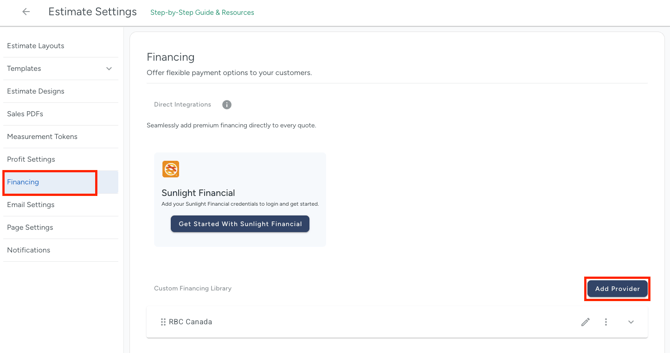
- Admins with Settings access can add Financing options by navigating to Estimate Settings and selecting the Financing option from the menu on the left.
- Then, select the Add Provider button.
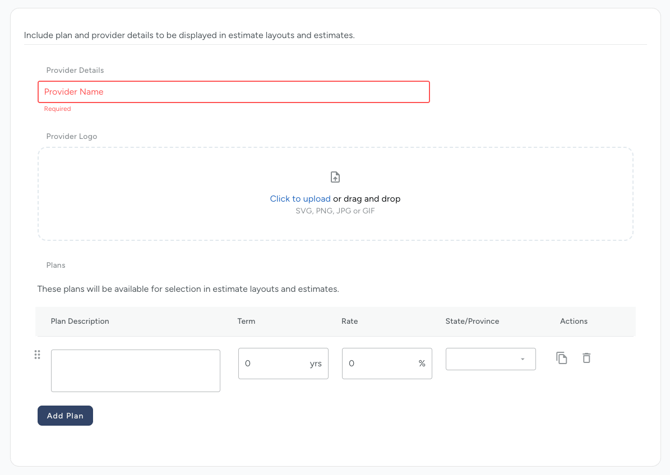
- On the next screen, enter the name of the provider.
- Upload the logo of the financing provider.
- Provide the specific details of the financing options offered by the unique provider. Once you have entered all the necessary information, click on the Add plan button and Publish the details.
- These plans will show up in your quotes so the homeowner can compare cash payments to financed payments.
Note:
-
Homeowners must be within the provider's specified region to select plans from that provider.
-
The option for 18-month financing is not currently available. Adding this option will result in an error message.
- The term field will only accept whole numbers and must be entered as the number of years desired as the term length.