![JN_Logo_Long-White@1x.png]](https://support.jobnimbus.com/hs-fs/hubfs/JN_Logo_Long-White@1x.png?height=40&name=JN_Logo_Long-White@1x.png)
Importing Sales Tax From QuickBooks Online
- Set up sales tax in QuickBooks Online as outlined in this Intuit article.
- If you need further help, be sure to refer to the Intuit article linked above or reach out to QuickBooks support.
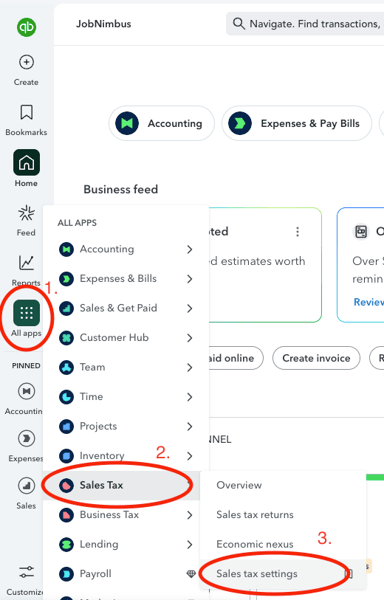
- If you need further help, be sure to refer to the Intuit article linked above or reach out to QuickBooks support.
- Once the tax rates are created, the tax rate needs to be used on a transaction within QuickBooks. Its API does not return unused tax rates.
- Create a dummy invoice to apply that tax rate to. Once the tax rate is used, you can then delete the dummy invoice.
- Once the tax rate has been created and used in QuickBooks, JobNimbus will be able to pull over the rates into the "Taxes" section of your JobNimbus Settings, for use on an estimate or invoice in the system.
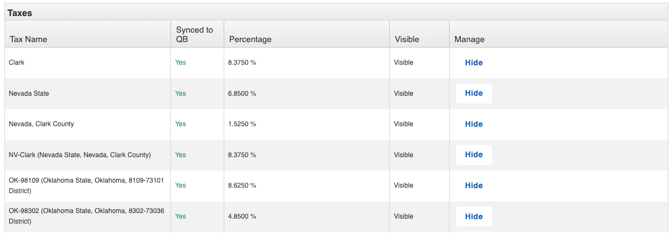
Note: JobNimbus will only import Taxes once per day at either 3 or 4 am Mountain Time