![JN_Logo_Long-White@1x.png]](https://support.jobnimbus.com/hs-fs/hubfs/JN_Logo_Long-White@1x.png?height=40&name=JN_Logo_Long-White@1x.png)
Pricing Inconsistancies
- During initial supplier setup, it is normal to see pricing that does not appear to be accurate.
Causes
- Pricing inconsistencies can be caused by the supplier catalogue not yet being fully synced or the product pricing not mapping correctly.
Troubleshooting
- Check that you have input the correct branch and job account in your supplier settings.
- Make certain that you have selected the correct option from the option dropdown below the product selection. Pricing is partially determined by the option selected.
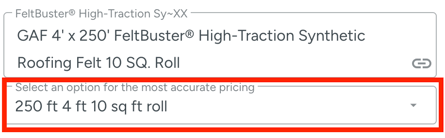
- Verify that you have selected the correct UoM on the product.
- Double check that the correct SKU or product has been selected.
- To be certain you have the correct SKU, you can copy it from the supplier website and search for the product directly from the supplier catalogue.
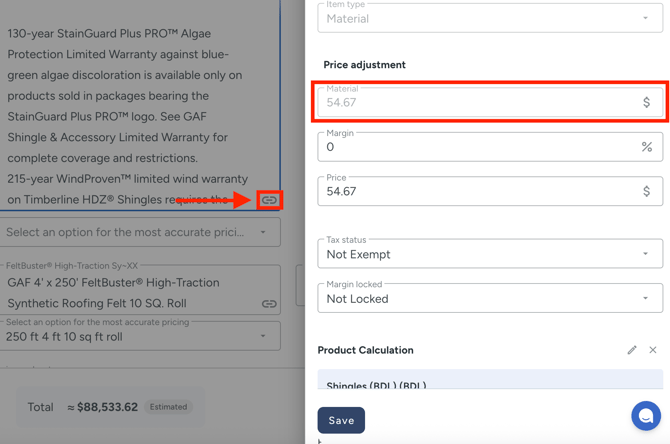
- Open the side panel by clicking the link button to review the item's cost vs price. The cost is displayed in the side panel in the Material field provided by the supplier, while the price is the full amount listed including any markups.
If you are unable to resolve the error using these steps, please contact our Technical Support Team for further assistance.
Availability Issues
- During initial supplier setup, you may see availability errors or missing items.
Causes
- The most common reason for these types of errors is branch availability.
- Availability is determined by the branch selected. If the branch shows that they do not offer an item, it will not show in the catalog search.
Troubleshooting
- Double check on the branch website that you have entered the correct SKU for the desired item.
- The name you may be looking for might actually be one of the selections in the options menu.
If you are unable to resolve the error using these steps, please contact our Technical Support Team for further assistance.