![JN_Logo_Long-White@1x.png]](https://support.jobnimbus.com/hs-fs/hubfs/JN_Logo_Long-White@1x.png?height=40&name=JN_Logo_Long-White@1x.png)
Resolution
-
In JobNimbus, click on your profile picture or initials and select Settings.
-
In the Settings menu on the left, select Products & Services.
-
In the dropdown at the top of the list that says "Visible", select “Both”.

-
Type the product that is not found into the Products and Services search bar to locate it.
-
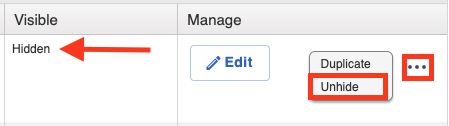
If the product is listed as Hidden, select the three dots to the right and choose the Unhide option so it can sync to QuickBooks.
-
Once the product has synced, “retry” the invoice in the sync error report.
-
Once it syncs, you can hide the product again in JobNimbus if you don’t want it to be used in the future.
-
If the product is active in JobNimbus but still not syncing to QuickBooks, refer to this article for troubleshooting steps.