![JN_Logo_Long-White@1x.png]](https://support.jobnimbus.com/hs-fs/hubfs/JN_Logo_Long-White@1x.png?height=40&name=JN_Logo_Long-White@1x.png)
On This Page
- Available Integrations
- Connecting a Supplier
- Using a Supplier on Estimates
- Ordering Materials
- Hiding Supplier Options on Estimates
Available Integrations
JobNimbus integrates with ABC Supply, QXO, and SRS Distribution. Once connected, you can build estimates from the supplier's catalog and order materials without leaving JobNimbus. To learn about each supplier, see What is QXO? and What is SRS Distribution?. For a supplier that isn't integrated, see How Do I Add a Supplier That is Not Integrated With JobNimbus?
Connecting a Supplier
Connect your supplier account in your Suppliers settings, then import your templates. Steps are in ABC Supply, QXO, and SRS Distribution.
Using a Supplier on Estimates
Choose a supplier, branch, and account on an estimate to add catalog items with live pricing. JobNimbus checks the supplier's current price when you add or update a linked item. Steps are in ABC Supply, QXO, and SRS Distribution. For layouts and the rest of estimate setup, see How do I Create or Edit Estimate Layouts? and How Do I Create an Estimate in JobNimbus?
Ordering Materials
Convert an estimate to a Material Order to place the order with your supplier. The supplier sends status updates back to JobNimbus. Learn more in How do I Create a Material Order? and How Do Integrated Suppliers Interact with Material Orders?
Hiding Supplier Options on Estimates
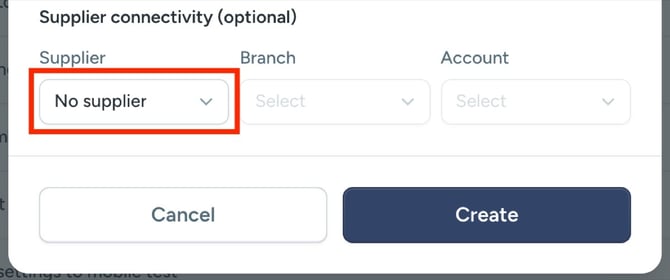
You can't hide supplier selection on estimates, and no setting turns it off. If you don't order from a supplier, create your estimate layout with Supplier left at No supplier under Supplier connectivity (optional).
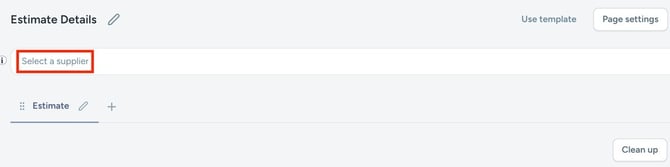
Estimates created from a layout set to No supplier still show the Select a supplier prompt. The prompt can't be hidden.