![JN_Logo_Long-White@1x.png]](https://support.jobnimbus.com/hs-fs/hubfs/JN_Logo_Long-White@1x.png?height=40&name=JN_Logo_Long-White@1x.png)
Roles
-
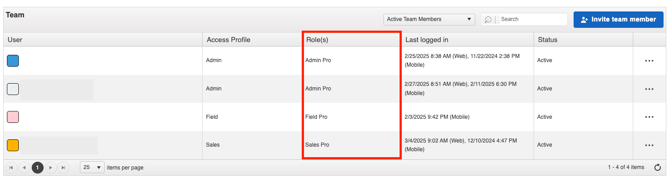
A team member's role is the way in which you decide what feature(s) a team member can access is by assigning them to a role.
-
You may select from the following roles:
-
Admin
-
Full JobNimbus access (includes Settings & Subscription).
- All Sales + Field tools
- Schedule appointments/jobs; assign Work Orders
- Unlimited Forms; order materials; track payments & A/R
- Production & commission reports
- E-signatures; manage subcontractors
-
-
Sales
-
Tools for selling (includes everything in Field access; no access to Settings or Subscription).
- Estimates & unlimited templates
- Unlimited custom Forms
- Sales reports
- E-signatures
- Commissions, job costs
-
-
Field
-
Jobsite tools (mobile only).
- Capture/annotate/share photos
- View & submit Forms
- Create/view mobile Work Orders
- Schedule crews & subcontractors
- Create & view Contacts and Jobs
- Access job documents
-
-
Subcontractor
-
External crew access for assigned Work Orders only (mobile only).
- No Contacts, Jobs, pricing, reports, access to financials, or Settings.
- View schedule & Work Orders
- Capture/annotate/upload photos
- Fill out Forms & checklists
- Mark tasks complete
- View Work Order status & add Work Order comments
- View individually shared files
-
-
Seats
-
The number of seats you assign to a role indicates how many unique users will be given that level of access to JobNimbus features.
-
Total Seats Used displays the number of open user seats you still have available.

Note:
- Deactivating a team member does not automatically reduce the number of seats for which you are paying. You will need to contact your Customer Account Executive to remove seats from your subscription.
- No refunds or credits will be provided if you fail to decrease the number of seats at any point during the billing cycle.