![JN_Logo_Long-White@1x.png]](https://support.jobnimbus.com/hs-fs/hubfs/JN_Logo_Long-White@1x.png?height=40&name=JN_Logo_Long-White@1x.png)
Board Access
Check to see if someone on your Team has access to the Board. More often than not, the Board's "Available to" settings have accidentally been changed to Just Me or Only Specific Groups.
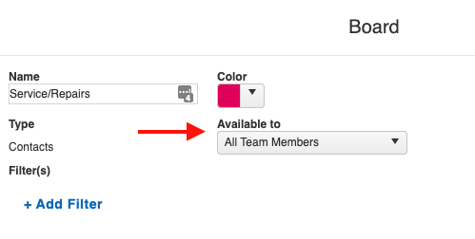
To restore access, do one of the following:
- Change the Available to dropdown to All Team Members to make the board visible to all team members.
- Add the affected user to the Group that is currently selected in the Available to setting.
Note: If you are not sure who still has access to a board, speak with your team members to find out who still has access and can make changes.
Why are my boards missing from the navigation?
The steps to find a missing board depend on which version of JobNimbus you are using.
Jobs V1 (legacy version): Both the Contacts tab and the Jobs tab have board pages. If your board is missing, you may be viewing the wrong tab.
- Click the Contacts tab or the Jobs tab (whichever is not currently highlighted).
- Check whether your board appears under that tab.
If your boards are missing, try clicking on the Contacts Tab or the Jobs Tab (whichever is not currently highlighted) to see if you have accidentally opened the wrong tab.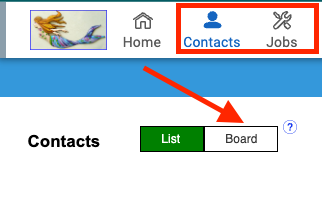
Jobs V2 (current version): Boards are accessed through the Jobs tab.
- Click the Jobs tab.
- Select the down arrow next to the Board name.
- View your available boards from the dropdown.
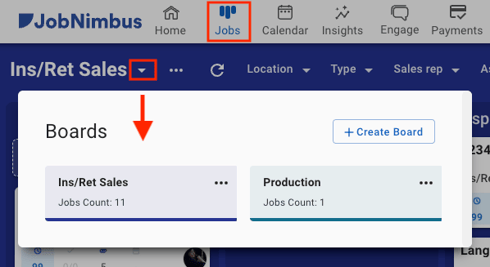
Refer to How Do I Use Board Filters? for more information about Board filters.